

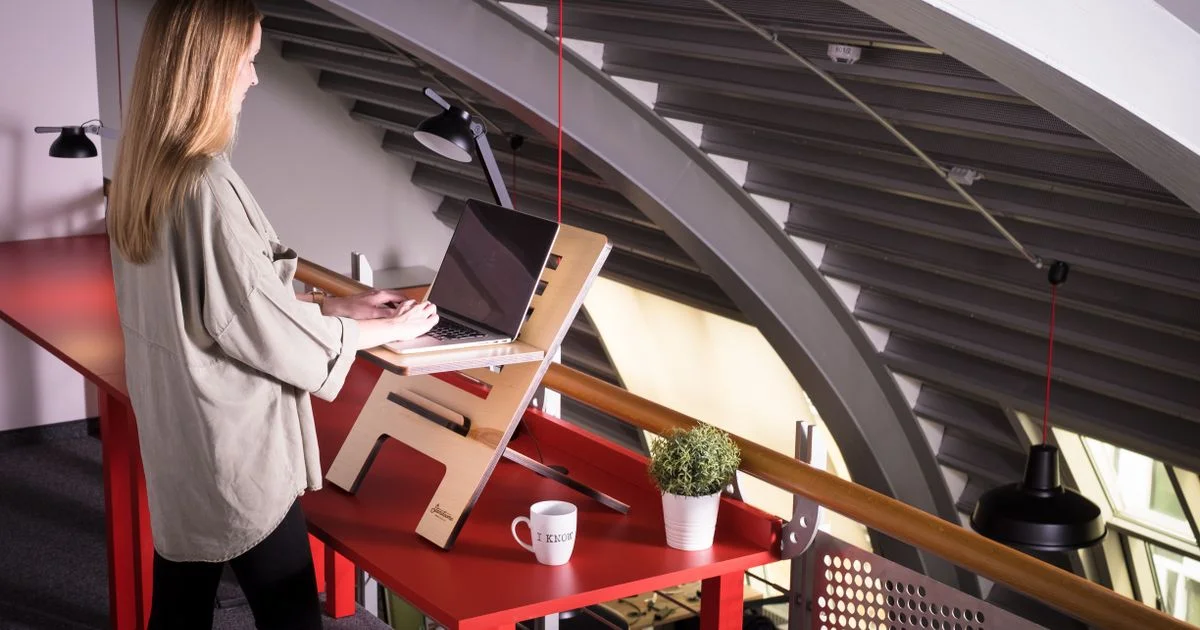
Most people who want to stand at work cannot replace the desk they have. It belongs to a landlord, an employer, or a room that will not fit anything bigger. A standing desk converter exists for exactly that gap: a riser that sits on the desk you already own and lifts your screen and keyboard when you want to be on your feet. Whether it is a good buy comes down almost entirely to the desk it has to sit on and the stuff you have to put on it.
Key Takeaways
- Measure your desk before anything else. Converters range from about 9 inches wide to 36 inches, and the big ones eat an entire small desk.
- Weight capacity is the spec that quietly rules out most models: 22 to 44 pounds, and two monitors plus a laptop gets there fast.
- Z-lift models rise straight up; X-lift and spring-assisted models often travel forward as they rise, which is a problem against a wall.
- OSHA’s ergonomic targets do not change when you stand: elbows bent 90 to 120 degrees, wrists straight, monitor at least 20 inches away.
- Standing all day is not the goal. Alternating between sitting and standing tasks is the whole point of the thing.
What a Standing Desk Converter Is Really Buying You
The short answer: reversibility. You keep the desk, you keep the deposit, you spend $120 to $430 instead of $600 and up, and if you hate standing you have lost a weekend rather than a room’s worth of furniture. It is a good case.
What you give up is also clear. Full sit-stand desks offer higher weight limits, better cable management, storage, and a wider height range because the whole surface moves. A converter adds its own base height to a desk you did not choose, so on a desk that is already tall for you, the math can fail before you start.
Any budget standing desk honest review should say that plainly: a converter is the right answer to a constraint, not a cheaper version of the same product.
A Small Desk in a Small Apartment
This is where converters go wrong most often: people buy the best-reviewed model and discover it covers the whole desk with an inch to spare on either side.
Work surfaces vary enormously. The VariDesk Pro Plus is 36 by 29.75 inches — nearly a small desk in itself — at about $429, with a 4.5 to 17.5 inch lift and 35 pounds of capacity. It ships assembled and lifts smoothly, but it travels forward as it rises, which needs clearance you may not have. At the other end, the Moft Z folds to about half an inch, costs around $60, and offers fixed heights of 4.7, 7.6 and 9.8 inches at a 22-pound limit. It is a travel laptop riser, not a workstation, and larger laptops wobble at full height.
For a genuinely small desk, look at the compact models. The Ergotron WorkFit-Z Mini (about $352) has a 31 by 16.3 inch surface, a 5.4 to 17.9 inch range and 25 pounds of capacity, designed with cubicles in mind. The Vivo 32-inch converter is around $120 with a 31.5 by 15.8 inch surface, a 4.4 to 19.6 inch pneumatic lift and 33 pounds of capacity — the value pick, with a shallow keyboard tray and no cable management to speak of.

A Rental or a Company Desk You Cannot Modify
If you cannot drill, clamp or replace anything, a converter is close to the only option, and what matters is what it needs from the desk underneath.
Most converters rest on the surface under their own weight, which is fine on a solid desk and unnerving on a wobbly one. If your desk already shakes when you type, adding 25 pounds of riser and a monitor 18 inches higher makes it worse. Tighten the desk first.
Monitor arms are the other consideration. Several models accept aftermarket arms, and the Mount-It! converter (around $280) ships with dual arms rated for 27-inch screens at 17.6 pounds each. It uses a gas cylinder like an office chair, has a 6.25 to 16.5 inch range and 33 pounds of capacity, needs real assembly, and is harder to lower than to raise.
Two Monitors, a Laptop, and a Docking Station
Add it up before you shop. A 27-inch monitor with its stand runs 12 to 18 pounds, a laptop and dock another 6 to 8, and a mechanical keyboard is heavier than people guess. A 22-pound converter is out of the conversation immediately.
The Flexispot EM7 is the outlier at about $200: a 44-pound capacity, the highest in this bracket, plus an electric motor, a 5.7 to 19.7 inch range and a 36 by 16.3 inch surface with a quickly removable keyboard tray. It lifts straight up rather than swinging forward, which is what you want against a wall. The trade-off is a bare-bones design with no height presets, so you hold the button every time.
The Branch Desk Riser (around $350) sits at the other extreme: a 30.7 by 24.3 inch surface, a 2.5 to 15.8 inch range, spring-assisted lift, no keyboard tray, and only 22 pounds of capacity — a single-screen product wearing a premium price tag.
Getting the Height Right Once You Own It
A converter that is set wrong is worse for you than the sitting desk it replaced, because now you are hunched and standing. OSHA’s neutral-posture guidance applies to both positions: hands, wrists and forearms straight and roughly parallel to the floor; elbows close to the body and bent between 90 and 120 degrees; shoulders relaxed with the upper arms hanging naturally; head level and in line with the torso. In the standing posture specifically, legs, torso, neck and head should be approximately in line and vertical, with feet slightly apart.
Two more practical numbers. Your monitor should sit at least 20 inches from your eyes, which on a shallow converter means pushing the screen to the back edge. And the 20 to 28 inches of leg clearance OSHA describes still has to be there for when you sit back down — so this is not the place to store the tower and a stack of files.
Set the keyboard height first, then the screen. Almost everyone does it in the wrong order and ends up with a good screen height and shrugged shoulders all day.
Which Situation Are You In?
| Your situation | What the converter needs | What to skip |
|---|---|---|
| Small apartment desk, laptop only | Compact footprint under about 32 inches wide; light and low-profile | 36-inch flagship models that swallow the whole desk |
| Rental or company desk, no modifications allowed | Free-standing weight-only placement; a solid desk underneath | Anything requiring a clamp, bolt, or drilled hole |
| Dual monitors plus a dock | 40+ pounds of capacity and monitor-arm support | 22-pound risers, however good they look |
| Desk pushed against a wall | A straight vertical (Z-style) lift | Spring-assisted designs that travel forward as they rise |
| Hot-desking or moving between rooms | A foldable laptop riser you can carry | A 30-pound workstation you will never relocate |
| Not sure you will even like standing | The cheapest model that fits your desk and gear | Spending $400 to test a habit you have not formed yet |
How to Choose Without Guessing
An adjustable desk riser comparison is only useful once you have measured your own situation. Do this before you open a single product page:
- Measure your desk’s usable depth and width, then subtract a few inches for the mouse space you actually use. That is your maximum converter footprint.
- Weigh what will sit on it. Monitors, laptop, dock, speakers, keyboard — add it up and shop for at least 25 percent more capacity than that number.
- Stand at your desk and measure from the desk surface to your relaxed elbow height. That is the lift you need at the keyboard tray, not at the monitor shelf.
- Decide whether the desk backs onto a wall. If it does, rule out anything that arcs forward at full extension.
- Choose manual or electric based on how many times a day you will actually switch. Twice a day, a spring lift is fine; six times, you will want a motor.
- Check whether a keyboard tray is included at all — several models at every price simply do not have one.
This is also why a list of the best sit stand desk ranked by score rarely helps: the winner is whichever one fits your desk, your gear and your wall.
How Long Should You Actually Stand?
Standing at a desk is not endurance training, and treating it that way is how people end up with sore feet and an unused riser. OSHA’s guidance is to change working position frequently: alternate seated and standing tasks, make small adjustments through the day, stretch, and take short walking breaks. A converter is a tool for varying your posture, not a new posture to hold for eight hours.
Most people settle into standing for calls, reading and email, and sitting for long stretches of concentrated typing. Let the task decide, and step down before your feet complain rather than after.
Related Articles
- Best Budget Office Chairs for Back Pain: What to Adjust
- Top 7 Desk Accessories for Productivity Worth Buying
- Portable Seat Massager: What Works in a Car, Chair, or Recliner
Frequently Asked Questions
The questions below come up once someone has decided they want to stand and started reading listings — and most of them are answered by a tape measure.
Will a converter work on any desk?
Almost, with two conditions. The desk has to be stable, because a riser raises the center of gravity of everything on it, and it has to be low enough that adding the converter’s base height still leaves your keyboard near elbow level when you sit. A desk that is already tall for you is the one case where a converter genuinely may not work.
Do I need a keyboard tray, or can I just put the keyboard on the top shelf?
You need the separate tray. A single-surface riser puts your keyboard at monitor height, which forces your shoulders up and your wrists into a bend — the exact posture the OSHA guidance warns against. Several models, including the Branch riser and the compact Moft Z, do not include a tray at all, so check before you buy.
Are electric converters worth twice the price of manual ones?
They are worth it in proportion to how often you switch. A spring or pneumatic lift takes a few seconds and both hands; that is nothing twice a day and irritating six times a day. Note also that a gas-cylinder model can be harder to push back down than to raise, which people rarely try in a showroom.
Can I use a monitor arm with a standing desk converter?
Often, yes — several models are built to accept aftermarket arms, and some ship with them, such as the dual-arm setup rated for 27-inch screens at 17.6 pounds per arm. Just count the arm and monitor against the converter’s total weight capacity, not just the desk’s.
The Bottom Line
A converter is the right answer when the desk is not yours to replace and the room is not yours to rearrange. Measure the desk, weigh the gear, and buy the smallest model that clears both numbers — then set the keyboard height first and let the day decide when you sit back down.


2 Comments
Comments are closed.