

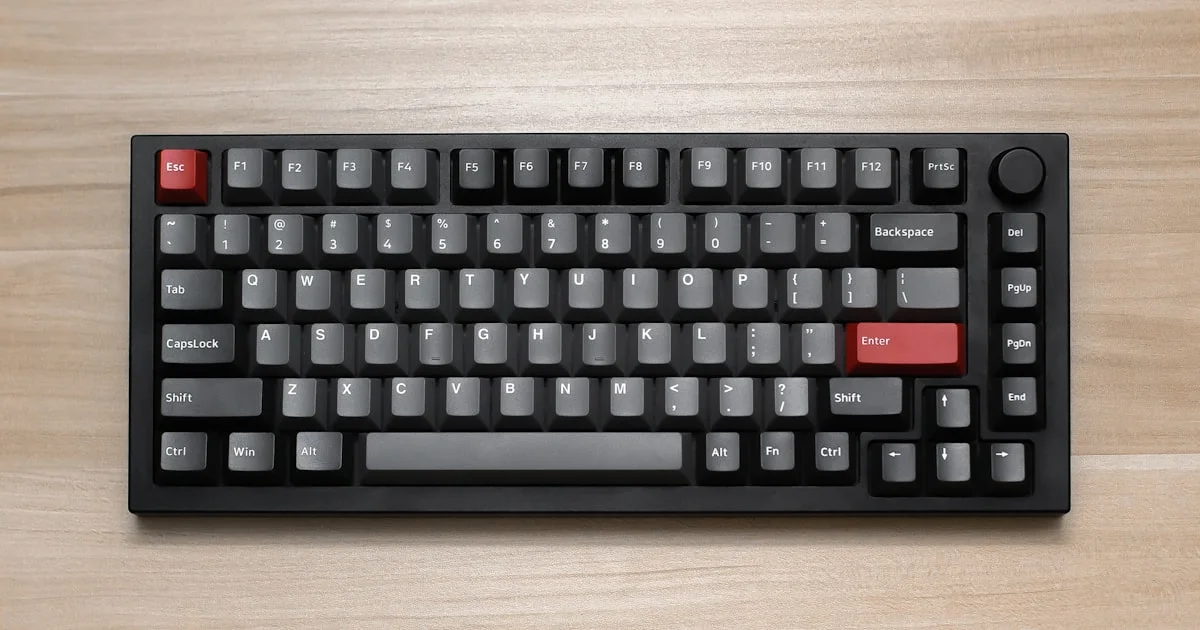
Mechanical keyboards used to be an enthusiast purchase with an enthusiast price tag. That has quietly changed. The cheapest mechanical keyboards under 50 dollars now ship with genuine mechanical switches, sockets that let you swap those switches without a soldering iron, and lighting that cost twice as much three years ago. The catch is that this same price bracket is crowded with membrane boards wearing mechanical marketing. Knowing what to look for matters more here than in any other keyboard tier.
Key Takeaways
- Hot-swap sockets are now common in the budget tier, which turns a cheap board into something you can upgrade later.
- Several big gaming brands sell “mechanical-feel” keyboards at this price that are actually membrane — read the switch name, not the box.
- Switch feel matters more than lighting. Linear, tactile and clicky are three genuinely different typing experiences.
- The savings almost always come out of the keycaps and the case, not the switches themselves.
- Layout is the choice you cannot fix later. Buy the size you will still want in a year.
What the Cheapest Mechanical Keyboards Under 50 Actually Get You
The short answer: real mechanical switches, a hot-swap socket on most current models, per-key lighting, and a plastic case. The money is saved on the parts you touch and hear — thin keycaps, a hollow-sounding case, and switches from budget manufacturers rather than premium ones.
That is a better deal than it sounds. The switch is the part that decides whether a keyboard feels good, and budget switch makers have closed most of the gap. Outemu switches are acceptable, house-brand switches from brands like Royal Kludge are good, and the occasional board ships with Gateron switches, which are excellent. All of them are rated for roughly 50 million keystrokes, which is far more typing than most people will do on one board.
What you do not get is a heavy case, a gasket-mounted plate on most models, thick keycaps, or factory-lubed switches. Those are the differences you notice on day one and stop noticing by week three.
Switch Types: Linear, Tactile and Clicky
Budget boards nearly always offer three switch colors, and the color tells you the feel. A cheap linear switch keyboard uses red switches, which press straight down with no bump and no click. They are smooth, quiet enough for a shared room, and the usual pick for gaming because there is nothing between you and the key press.
Brown switches are tactile. There is a small bump partway down that tells your finger the key has registered. Most people typing all day prefer them. Blue switches are clicky — the bump comes with a loud, sharp click. They are satisfying and genuinely annoying to anyone sitting near you, which is why they belong in a private room or nowhere.
If you cannot decide, buy tactile. It is the least polarizing of the three, and on a hot-swap board you can change your mind later for the price of a switch set.
Why a Budget Hot Swappable Mechanical Keyboard Is Worth a Few Extra Dollars
A budget hot swappable mechanical keyboard has small sockets on the circuit board instead of soldered switches. You pull a switch out with a cheap puller and push a new one in. No heat, no tools, no risk.
This single feature changes what a cheap keyboard is. Without it, if you buy blue switches and discover you hate the noise, you have wasted your money. With it, you buy a set of quieter switches and keep the board. It also means a keyboard bought now can be quietly upgraded twice over several years while costing less than one mid-range board.

Hot-swap sockets have become close to standard on new budget boards, so there is little reason to accept a soldered model unless it is unusually good in some other way. Check the listing for the phrase “hot-swappable” or “MX-compatible sockets” rather than assuming.
Layout: The Choice You Cannot Undo
Layout is about which keys physically exist. Nothing you buy later fixes a missing arrow cluster. Here is how the common sizes compare.
| Layout | Best for | Trade-off |
|---|---|---|
| 60% | Small desks, gaming, minimal setups | No arrow keys or function row; everything is a key combination |
| 65% | Most people — compact but still usable | Still no dedicated function row |
| 75% | Anyone who wants function keys without a wide board | Keys sit tightly together; brief adjustment period |
| TKL (tenkeyless) | Typing-heavy work and office use | Takes noticeably more desk space |
| Full-size | Spreadsheets, data entry, accounting | Pushes your mouse further from your body |
The 65% layout is the safest default. It keeps the arrow keys, which is where most 60% owners eventually get frustrated, while staying small enough to leave real mouse room.
What an Affordable RGB Mechanical Keyboard for Gaming Really Offers
Almost every board in this range advertises lighting, but there is a meaningful difference between the versions. An affordable RGB mechanical keyboard for gaming should have per-key RGB, meaning each key has its own LED and can be set to its own color. The cheaper alternative is single-zone lighting, where the whole board changes color at once.
What budget lighting usually lacks is software control. Many cheap boards handle effects entirely through key combinations, with no app to save custom layouts. That is fine if you just want the board to glow. It is limiting if you wanted to map specific keys to specific colors for a game.
A few budget boards support QMK or VIA, the open-source tools that let you remap any key and store the change on the keyboard itself. That is genuinely valuable and worth checking for, though it is rare below fifty dollars.
Where the Corners Get Cut
Every cheap keyboard makes compromises. These are the ones that show up most:
- Keycaps. Budget boards ship thin ABS plastic, which develops a shiny, slick patch on the most-used keys after several months. Replacement PBT keycaps are inexpensive and fix this completely.
- Case sound. A light plastic case leaves an empty space under the switches, which produces a hollow, rattly sound. A strip of foam inside makes a surprising difference.
- Stabilizers. The wide keys — space bar, shift, enter — often rattle. This is the most common complaint about cheap boards and the hardest to ignore.
- Wireless quality. Bluetooth exists at this price and works fine for typing, but the latency is not ideal for competitive gaming. Plug in the cable when it matters.
How to Shop Without Getting Burned
- Find the actual switch name in the listing. If it says “mechanical feel,” “mem-chanical,” or does not name a switch at all, it is a membrane keyboard.
- Be skeptical of the big gaming brands in this bracket. Their genuinely mechanical models usually start well above fifty dollars.
- Confirm hot-swap support explicitly. Do not infer it from the price.
- Pick your layout before your color scheme. Layout is permanent; lighting is not.
- Choose the switch by where you will use the board. Clicky switches in a shared office will make you unpopular fast.
- Budget about ten dollars extra for PBT keycaps. It is the single best upgrade you can make to a cheap board.
Related Articles
- Top 7 Desk Accessories for Productivity Worth Buying
- Best Wireless Mouse for Productivity: Office Buying Guide
- Best Budget Gaming Controller for PC: What to Look For
Frequently Asked Questions
These are the questions that come up most often from people buying their first mechanical keyboard on a tight budget.
Are cheap mechanical keyboards actually mechanical?
The genuine ones are. The problem is that several well-known gaming brands sell membrane keyboards in this price range using language that implies otherwise. If the listing names a specific switch — Outemu Red, Gateron Brown, and so on — it is mechanical. If it only says “mechanical feel,” it is not.
How long will a budget mechanical keyboard last?
The switches are typically rated around 50 million keystrokes, so they are rarely the part that fails. What wears out first is the keycap coating, which goes shiny, and sometimes the USB cable connection. Both are cheap to replace, and on a hot-swap board even a dead switch is a two-minute fix.
Do I need software to use one?
No. These keyboards work as soon as you plug them in, with no drivers. Software only matters if you want to remap keys or save complex lighting patterns, and many budget boards handle basic lighting through key combinations instead.
Is wireless worth it at this price?
It is if you value a clean desk and mostly type. Bluetooth and 2.4 GHz models exist under fifty dollars and connect reliably. For competitive gaming, the extra input delay is real enough that most players use the cable anyway, so a wired board at the same price will usually have better build quality elsewhere.
The Bottom Line
The budget mechanical tier is genuinely good now, as long as you shop by switch name and socket type rather than by brand. Pick a 65% or TKL layout, insist on hot-swap, choose tactile switches unless you have a reason not to, and plan on new keycaps later. That combination gets you a keyboard you will keep using long after you have forgotten what it cost.


1 Comment
Comments are closed.