

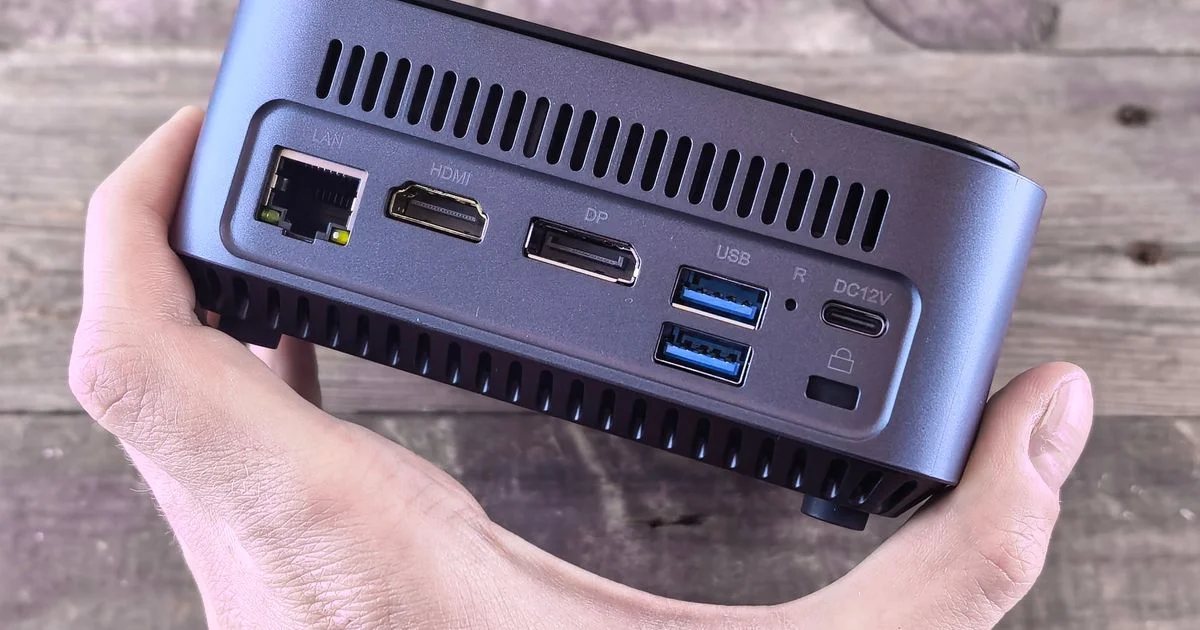
There is a size below which a desktop computer stops behaving like furniture and starts behaving like an accessory. An Acemagic mini PC for home office work sits below that line, and the reason people buy one is rarely speed. It is that the machine disappears, and the desk goes back to being a desk.
This is an independent editorial review. We are not affiliated with Acemagic, and no brand reviewed or approved this article. Other companies are named only as reference points. Specifications and policies change, so check the current product page before ordering.
Use case 1: The desk where an Acemagic mini PC for home office work actually goes
A mini PC has two homes on a desk, and they ask for different things. It either sits beside the monitor, where the ports need to face somewhere you can reach, or it hangs behind the monitor, where nothing needs to be reachable but the screen has to be able to carry it.
Acemagic lists its AM08 Pro at 149.6 by 77.8 by 188.5 millimeters, which is roughly 5.9 by 3.1 by 7.4 inches, and 1.5 kilograms, or about 3.3 pounds. That is a shoebox lid of desk space. Its published port list is two HDMI 2.0 outputs rated at 4K at 60Hz, a USB4 Type-C port rated at 8K at 60Hz, two front USB3.2 Gen2 Type-A ports at 10Gbps, two rear USB3.2 Gen1 Type-A ports at 5Gbps, a 2.5Gbps RJ45 Ethernet jack, a 3.5mm audio jack and a DC input, with what the company calls “triple-display support”. For the hang-it-behind-the-screen version, Acemagic’s own home-office write-up says its K1 model comes with a VESA mount for putting the machine behind a monitor, and lists HDMI 2.0, DP 1.4b, USB-C and Wi-Fi 6 with support for “three 4K displays”.
Before the ports matter, one gate does. Microsoft publishes the floor for Windows 11 as a processor of “1 gigahertz (GHz) or faster with two or more cores on a compatible 64-bit processor or system on a chip (SoC)”, “4 gigabytes (GB) or greater” of memory, “64 GB or greater available disk space”, firmware that is “UEFI, Secure Boot capable”, “Trusted Platform Module (TPM) version 2.0”, graphics “Compatible with DirectX 12 or later, with a WDDM 2.0 driver”, and a “High definition (720p) display”. Microsoft also notes that “There might be more storage requirements over time for updates, and to enable specific features within the OS”, which is the sentence that quietly rules out the smallest storage configurations for a machine you intend to keep.
Run through this before you order, in this order:
- Look at the back of your monitor. If there is no free mounting pattern, or the stand already uses it, the behind-the-screen plan is over before it starts.
- Count the screens you want and which cable each one takes. Two HDMI and a USB-C is three displays only if your monitors can accept those three inputs.
- Decide which ports you touch daily. A headset and a card reader you plug in every morning belong on the front of the machine, not behind it.
- Check the storage figure against Microsoft’s note above rather than against today’s install size.
One policy detail belongs in this section rather than in a footnote, because it is a home-office fact. Acemagic’s published support hours are “Mon – Fri: 5 PM – 2 AM (PT)”. If this is the machine your job runs on, support opens in the evening Pacific time, which is the middle of the night for most of the country and not during a working Tuesday morning. Its published terms also list a two-year warranty on current purchases, with three-year coverage retained on products bought before August 1, 2025, and a “30-Day Money-Back Guarantee” that requires undamaged products returned with “all accessories” and “original packaging” – so keep the box until you are sure.
You can check current options here:
Check on Amazon See on Walmart
Use case 2: An Acemagic mini PC for small spaces, a rental or a shared room
An Acemagic mini PC for small spaces solves a problem a laptop also solves, so the honest question is what it does that a laptop does not. Three things, mostly: it leaves the desk surface clear, it takes a wired network connection, and it stays where it is instead of being carried to the sofa and left there.
A small machine concentrates heat, which is why the cooling claims matter more here than they would in a tower. Acemagic describes “Dual Fan Cooling” on the AM08 Pro with “added vents and fans for SSD cooling”, and says of its M5 that a “Dual-airflow cooling architecture sustains a 55W continuous power draw”. The company is also candid about the trade in the other direction: of its AM18 it writes that “High fan RPM under sustained gaming loads creates physical noise”. In a bedroom corner or a shared room, that sentence is the specification that matters.
Three placement habits do more for a small room than any spec:
- Leave the vented sides clear. Pushing the machine against a wall or into a closed cabinet turns a quiet computer into a loud one.
- Use the Ethernet jack if there is a wall socket anywhere near. In an apartment building, a wired connection is the cheapest fix for bad Wi-Fi you are not allowed to re-cable.
- Plan for the power brick. External adapters are the part that ends up dangling behind the desk, and they are wider than the machine’s own footprint suggests.
Use case 3: An Acemagic mini PC for streaming on the living room TV
The living room is where a small box is most obviously in its element, because the television already has an empty shelf under it. An Acemagic mini PC for streaming is a full computer on a TV, which is both the advantage and the catch: it plays anything a browser can play, and it also expects a keyboard.
The connection is the easy part. Acemagic lists HDMI 2.0 outputs rated at 4K at 60Hz across the models above, which is what a 4K television wants. The parts people get wrong are on the television’s side of the cable. Text rendered by a computer is far less forgiving than video, so put the set into its PC or game input mode, which is where televisions stop applying the smoothing and sharpening that make a spreadsheet look wrong. Check that the picture reaches the edges of the panel rather than being cropped. And run an Ethernet cable to the box if the shelf is near a socket, because the living room is usually the room furthest from the router.

Use case 4: An Acemagic mini PC for gaming, honestly
An Acemagic mini PC for gaming is a real option with a real ceiling, and the ceiling is worth stating plainly before the ports. Machines this size use integrated graphics rather than a separate graphics card, and Acemagic’s own home-office article describes its AM18 in terms of “1080p gaming” rather than anything above it. That is an honest description of the category, not a criticism of one model.
Within that ceiling the connectivity is generous. Acemagic lists the AM18 with USB4 at 40Gbps, HDMI 2.1, DP 2.0 and dual LAN at 2.5G and 1.0G. The USB4 port is the interesting one for a desk that changes shape, because a single cable can carry a display and data at once.
The realistic read: at 1080p on a monitor, older and less demanding titles, and anything that streams from a console or a service, this class of machine is fine. If the games you actually play are the current, heavy ones at high refresh rates, the money belongs in a tower with a graphics card, and no small chassis changes that.
Side-by-side by situation
| Your situation | What decides it | What to watch |
|---|---|---|
| Home office, one or two monitors | Port placement, a free mounting pattern behind the screen, storage headroom | Support hours fall outside a US working day |
| Rental or shared room | Vent clearance, fan behavior under load, a wired network jack | Sustained loads are the noisy ones, by the maker’s own account |
| Living room television | HDMI 2.0 at 4K and 60Hz, the TV’s PC or game input mode | Text looks wrong until picture processing is turned off |
| Light gaming at 1080p | Integrated graphics and the display outputs you already own | Current demanding titles are outside this class entirely |
| Replacing an aging tower | The Windows 11 floor, including TPM 2.0 and Secure Boot | Keep the packaging until the return window closes |
Related Articles
- Portable Monitor for Laptop: Hotel Desk, Kitchen Table, or Cafe
- SSD for Gaming PCs: One Slot, a Laptop, or a Video Project
- Top 10 External Hard Drives for Backup: Desk, Travel, or Off-Site
Frequently Asked Questions
The questions below come up after the box is on the desk rather than before it, which is usually when the answers matter.
Can a mini PC really drive three monitors?
Acemagic lists triple-display support on several models, including three 4K displays on the K1. The limit in practice is on your side of the cable: the three outputs are typically two HDMI and one USB-C or DisplayPort, so each monitor has to accept one of those inputs, and USB-C monitors have to support video over that port.
Will it run Windows 11?
Check the published requirements rather than the marketing copy. Microsoft’s floor includes TPM 2.0, UEFI firmware that is Secure Boot capable, 4GB of memory and 64GB of storage, and Microsoft warns that storage needs grow over time. A current machine from any maker should clear it, but a very cheap or older model is exactly where it fails.
Is a mini PC quiet enough for a bedroom?
At office workloads, generally yes. Under sustained load it depends on the model and on where you put it, and Acemagic itself describes high fan speed and audible noise on its gaming-oriented AM18 during long sessions. Give the vents clearance and keep the machine off a soft surface.
What happens if it arrives faulty?
Acemagic publishes a 30-day money-back guarantee that requires the product undamaged and returned with all accessories and the original packaging, and a two-year warranty on current purchases. Its listed support window is evenings and overnight Pacific time, so plan for a reply the following day rather than the same afternoon.
Conclusion
A mini PC is chosen by the room, not by the benchmark. Measure the space behind the monitor, count the screens and the cables they need, check the Windows floor and the storage headroom, and read the support hours before the spec sheet. Get those four right and the machine stops being a computer you look at and becomes one you forget about.


