

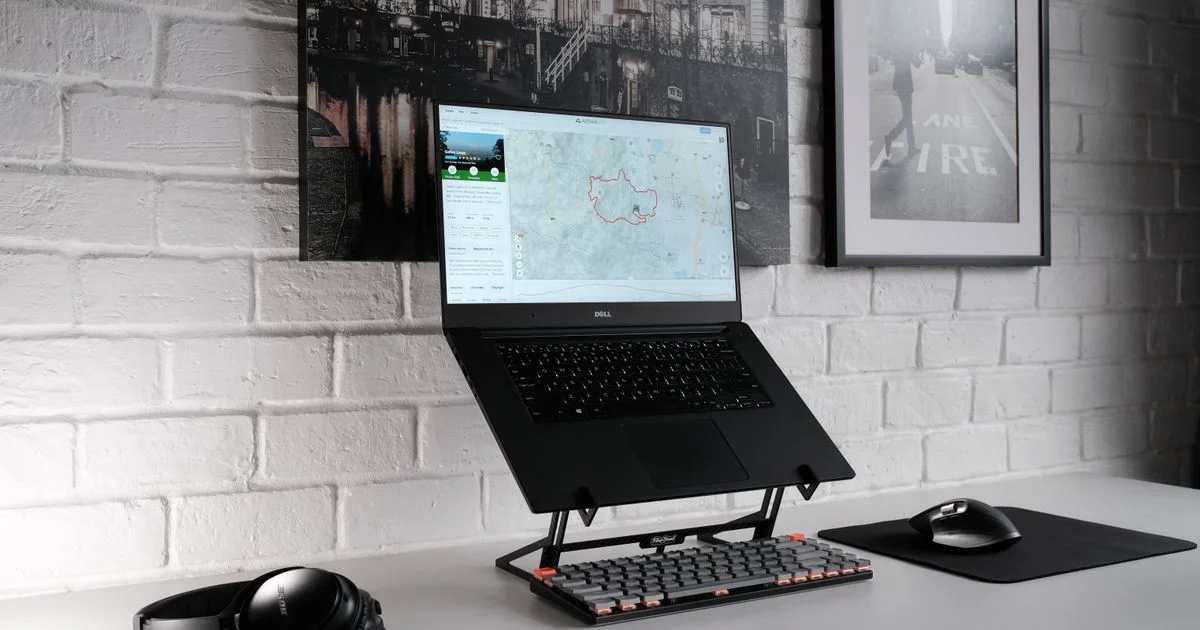
A laptop is a compromise you carry around: the screen is bolted to the keyboard, so one of the two is always in the wrong place. Every adjustable laptop stand buying guide is really answering the same question — how do you raise the screen without leaving your hands somewhere they will hurt by Thursday?
The answer changes with where the laptop sits. A stand that is perfect on a permanent desk is dead weight in a backpack, and the one that folds into a bag will wobble under a 17-inch gaming machine.
Key Takeaways
- A stand only helps if you add an external keyboard and mouse. Raising the screen alone just raises your hands too.
- Aim for the top of the screen at or slightly below eye level, with the display 20 to 40 inches from your face.
- Travel risers weigh a fraction of desk stands — about 6 to 8 ounces versus 3 pounds for a solid aluminum one.
- Wobble comes from folding joints. Fixed one-piece stands have none because they have no moving parts.
- Check the weight rating against your actual laptop; some stands are rated for as little as 8.8 pounds.
What This Adjustable Laptop Stand Buying Guide Comes Down To
The short answer: pick the stand for the room, then buy the keyboard. Every recommendation in this adjustable laptop stand buying guide follows from where the laptop lives, because that decides whether you need height, portability, or stability — and no single stand is good at all three.
The health case is settled and boring. Mayo Clinic’s office ergonomics guidance says plainly that external keyboards and stands are the way to make a laptop behave like a desktop, and that low screens and cramped input devices are what cause the discomfort. OSHA’s workstation guidance gives the numbers: the top of the monitor at or slightly below eye level, the center 15 to 20 degrees below horizontal, and a viewing distance between 20 and 40 inches.
The Permanent Desk
If the laptop lives on one desk and rarely moves, buy for stability and forget portability entirely. This is where a single-piece aluminum stand wins: no hinges, no detents, nothing to work loose. The Rain Design mStand is the archetype — around $50, a fixed six-inch lift, fits 13 to 16-inch machines, and has zero moving parts, which means zero wobble. The Twelve South Curve SE does the same job at about 6.5 inches and $40, with the whole underside of the laptop left open to air.
Adjustable desk stands trade some rigidity for range. The Besign LSX3 covers 4.92 to 7.65 inches with a U-shaped airflow cutout, and Rain Design’s iLevel2 runs 5.4 to 7.9 inches with a slider for angle. Reviewers report noticeable flex on both when you type directly on the laptop.
These stands all assume you are typing on something else. Set it up in this order.
- Put the laptop on the stand and sit the way you normally sit, feet flat on the floor.
- Raise the stand until the top of the screen is at or just below your eye level. If you wear bifocals, drop it another inch or two so you are not tipping your head back.
- Push the whole thing back until the screen is roughly an arm’s length away — no closer than 20 inches, no further than 40.
- Put the external keyboard in front of the stand and set your chair so your forearms are roughly parallel to the floor with your wrists straight.
- Tilt the screen so it faces you square on, usually no more than 10 to 20 degrees, and turn the desk so the screen sits perpendicular to any window rather than facing it.
The Bag You Carry Every Day
Hot-desking, campus, a coffee shop three days a week — here the number that matters is ounces, not inches. Any useful portable laptop riser comparison starts with the fact that folding travel stands weigh almost nothing compared with desk models.
The Roost Stand v3 is the benchmark at roughly 6.3 ounces, adjusts from 6.5 to 12.5 inches, handles 12 to 18-inch laptops, folds to about the size of a baton, and costs around $90. The Nexstand K2 does much the same in glass-fiber-reinforced nylon at about 8 ounces with eight height positions from 5.5 to 12.6 inches, for roughly half the price; its detents wear in over a year of daily folding.
The gap against desk models is stark: the Lamicall aluminum stand weighs 3.25 pounds, and the Brocoon folds to 1.1 inches thick but still weighs 3 pounds. Fine on a desk, wrong in a bag five days a week.
Two travel warnings. You still need a keyboard, and a folding one cancels some of the weight you saved. And a tall stand puts the laptop’s mass well above the desk, so a wobbly café table becomes a real problem.
The Couch, the Bed, and the Kitchen Counter
Nothing on a desk translates here. A stand needs a flat, stable surface, and a duvet is neither. What works in these spots is a different product category altogether: a lap desk with a hard top and a cushioned base, which gives the laptop somewhere firm to sit and keeps the heat off your legs.
The LapGear Home Office lap desk is the plain version at about $35 and 2.2 pounds, with a phone slot and airflow standoffs underneath. The Lululook 2-in-1 pairs a marine-plywood top with a bead-filled cushion and an arm that lifts a device 4.7 to 10 inches, at around $46 and 4.2 pounds.
These fix the heat and the sliding, not the posture. No couch position is good for your neck over three hours, and the useful advice is to move rather than buy better furniture for staying put.
Matching the Situation to the Stand
Reading a best laptop stand ranked list from top to bottom will not tell you much, because the top pick is ranked for someone else’s desk. This table compares situations instead.
| Your situation | What it actually needs | What you can skip |
|---|---|---|
| One desk, laptop never moves | Fixed one-piece aluminum, external keyboard and mouse | Height adjustment, folding hinges |
| Hot-desking or campus, daily carry | Folding riser under 9 ounces, folding keyboard | Weight capacity headroom you will not use |
| Shared table cleared every evening | Fast one-hand fold, small footprint | Multi-part assembly, screwed-together bases |
| 17-inch or gaming laptop | A stated weight rating well above your machine | Lightweight travel risers entirely |
| Couch, bed, or recliner | Lap desk with a hard top and airflow standoffs | Any stand that assumes a flat desk |
| Want to stand for part of the day | A riser that reaches 15 inches or more | Buying a full standing desk first |
| Fanless laptop that runs hot | Open underside, no solid tray beneath the vents | Active cooling pads for ordinary office work |
Standing Up Without Buying a Standing Desk
A tall laptop stand is the cheapest route into standing work, and it works if you type on a separate keyboard on the desk below. The obVus minder Laptop Tower II reaches a maximum of 20 inches, adjusts its tray angle, and costs about $89.99. The MOFT Z folds through five positions from flat to full standing at around $70 and 2.1 pounds, though it works best with 13 to 14-inch laptops and takes up a wide footprint when open.
The honest limit is the keyboard: when the screen goes up 15 inches, your hands still need to stay near elbow height. A stand that lifts the whole laptop and expects you to type on it standing is worse for you than sitting.
Wobble, Weight, and Heat

An ergonomic stand honest review is mostly a list of ways the thing annoys you at 9 a.m. Three failure modes come up over and over, and all three are visible in reviews if you read past the star rating.
- Wobble. Every hinge is a place the stand can flex. Reviewers describe “slight wobble while typing” on folding models and “flexes quite a lot” on some adjustable trays. It only matters if you type on the laptop itself, which is the setup a stand exists to replace.
- Weight rating. These vary far more than you would expect: one popular folding stand is rated to 40 pounds, a common aluminum desk model to 8.8. Check before you put a 6-pound gaming laptop on a stand built for an ultrabook.
- Heat. Lifting the laptop improves airflow underneath, which helps most on fanless machines. A solid tray directly under the intake vents undoes that, so look for cutouts or an open frame.
Two smaller checks: whether the hinge needs one hand or two — a stand you have to wrestle is one you leave at a single height forever — and whether it arrives assembled.
Related Articles
- Standing Desk Converter: Small Desk, Rental, or Shared Office
- Top 7 Desk Accessories for Productivity Worth Buying
- Best Budget Office Chairs for Back Pain: What to Adjust
Frequently Asked Questions
The questions that come up most are about whether the keyboard is really necessary, what height to pick, and whether the cheap stands are as bad as they look.
Do I really need an external keyboard?
Yes, if the point is comfort. Raising the screen to eye level lifts the keyboard with it, so your shoulders come up and your wrists bend back. Every recommendation here assumes the keyboard comes back down to desk level, and a basic wired keyboard and mouse cost less than most stands.
What height should the stand be set to?
High enough that the top of the screen sits at or just below your eye level when you are sitting normally, with the display centered 15 to 20 degrees below horizontal. For most people at a standard desk that is six to ten inches of lift, which is why so many adjustable models cover that range.
Will a stand help my laptop run cooler?
Usually a little. Getting the chassis off the desk lets air move underneath, which matters most on thin fanless laptops that rely on the case to shed heat. The gain is modest and disappears if the tray blocks the vents — a side benefit, not a reason to buy.
Are cheap folding stands worth it?
Often, yes. A $45 nylon folding riser does the same ergonomic job as a $90 one — it just flexes more, and its detents loosen over a year or two. Worth avoiding: the adhesive kickstand stuck to the laptop lid and the single-arm acrylic design, neither stable enough to earn the desk space.
The Bottom Line
Decide where the laptop actually lives, and the stand picks itself: one solid piece of aluminum for a desk that never changes, a half-pound folding riser for a bag, a lap desk for the couch. Then buy the keyboard, because without it a stand just moves the problem from your neck to your wrists.


